
Simple Guide to Opening Your MulaStar Account
Ready to join MulaStar? Follow these easy steps to create your account successfully.
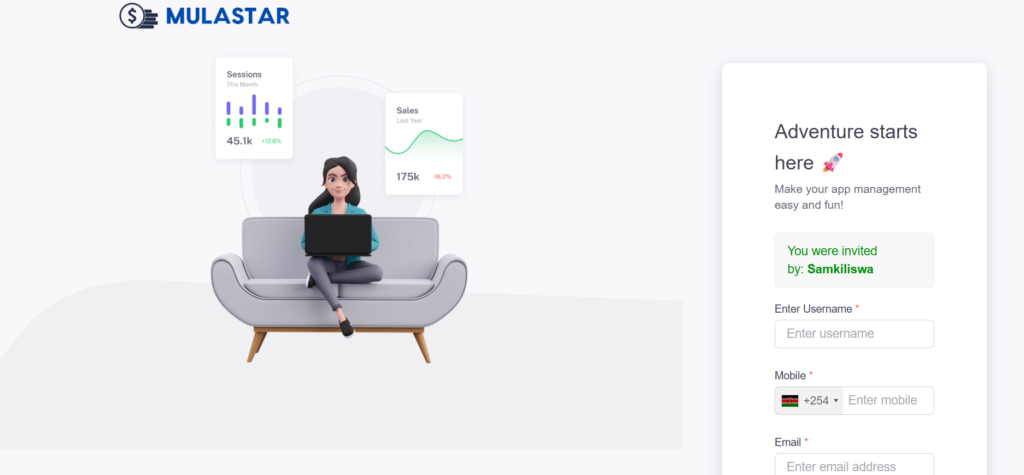
Step 1: Click the Registration Link
Tap or click the MulaStar registration link.
You’ll be redirected to the sign-up page (as shown in the screenshot).
Step 2: Choose Your Username
Create a unique username that you can easily remember.
Example: samkiliswa
⚠️ This username will be required every time you log in, so choose wisely.
Step 3: Add Your Mobile Number
- Select your correct country code first.
- Enter your phone number starting with 7 or 1.
- Do NOT include the country code in the number field.
Example:
794800571
114688883
Step 4: Enter Your Email Address
Provide a valid and active email address.
📩 Your email will be used for:
- Password recovery
- Receiving important updates and earning notifications
Make sure there are no spelling errors.
Step 5: Create a Password
Choose a password with at least 4 characters (letters and/or numbers).
Example: 432G
Pick something secure but easy for you to remember.
Step 6: Confirm Your Password
Re-enter the same password to verify it.
Final Step
✔️ Your country will automatically appear after entering your phone number.
✔️ Click the Create Account button.
✔️ Follow the activation instructions on the next page.
Once activated, you’ll gain full access to your MulaStar dashboard and can start earning.