
Register MulaStar
1. Enter Username
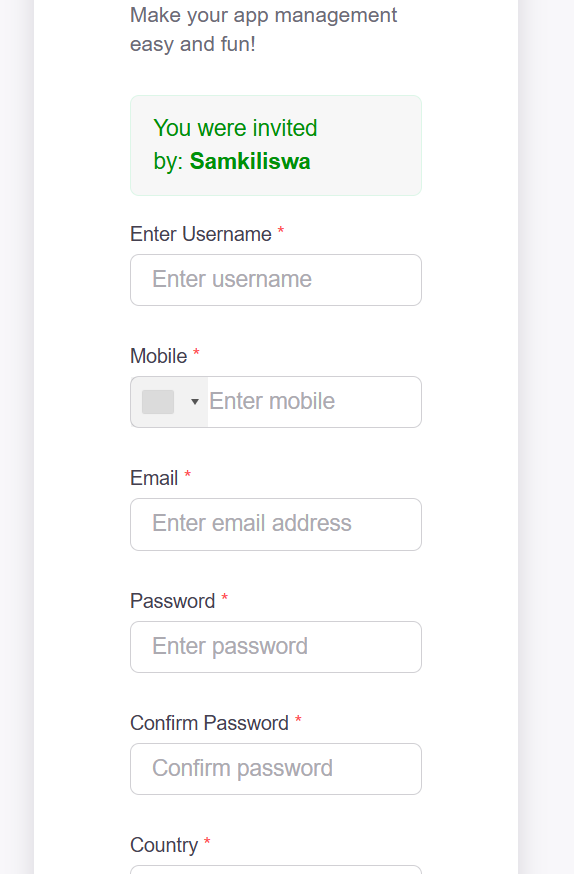
- Choose a unique username you can easily remember.
- Example:
samkiliswa - This will be your login ID whenever you access MulaStar.
2. Enter Mobile Number
- First, select your country code from the dropdown.
- Then type your phone number without the country code, starting with 7 or 1.
- Example:
794800571or114688883.
3. Enter Email Address
- Provide a valid email address.
- Double‑check spelling to avoid mistakes.
- Your email will be used for:
- Password resets
- Receiving MulaStar earning notifications
4. Enter Password
- Create a password with at least 4 characters (digits or letters).
- Example:
432G - Make sure it’s memorable but secure.
5. Confirm Password
- Re‑type the same password to confirm.
- This ensures you didn’t mistype the first entry.
6. Country Selection
- The system will auto‑detect your country once you enter your mobile number.
- No need to manually change it.
7. Create Account
- Click the “Create Account” button.
- You’ll be redirected to the activation procedure page.
- Follow the instructions there to activate your account and access your MulaStar Dashboard.
✅ Tip for smooth onboarding:
- Use an email you check often.
- Save your username and password securely.
- If you’re preparing guides or flyers for new users, you can repackage these steps into a visual checklist or WhatsApp broadcast format for quick conversions.